



In this article, we will discuss “how to hide the last scene in Telegram”
Messaging platforms such as Telegram or Signal have benefited the most from WhatsApp’s new privacy terms and policies. Especially in the last few days, the number of their users has increased significantly. Last week’s figures also showed the massive growth of telegrams. Note Telegram is a cloud-based messaging platform with its own privacy terms. Users of this application, like WhatsApp, can keep their ‘last seen’ time secret from others. It is possible to take advantage of this feature by following a few simple instructions. Let’s find out how to hide the last scene in Telegram.
Read More: Video calls can be made all day for free, the big surprise of Microsoft Teams
Now follow the step by step method “how to hide the last scene in Telegram”
1. First open the Telegram application on your device.

2. Then tap the hamburger menu on the top left of the screen.
3. When the menu opens then click on the Settings option.
4. Then select the Privacy & Security (Privacy & Security) option.
5. Now click on the ‘Last seen’ option. This will allow you to determine exactly who in your contacts will see the time of your last scene. Here you will see three options (Everybody / My Contacts / Nobody). Choose the ‘Nobody’ option from among them to hide your last scene from everyone else.
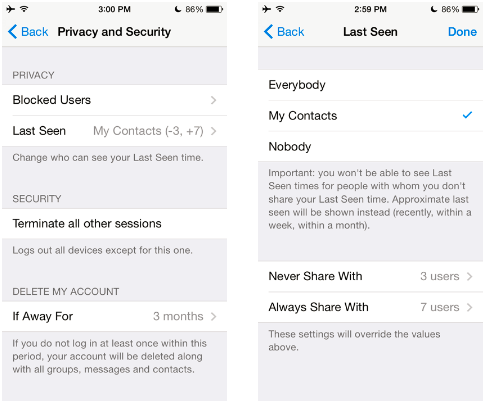
6. Now click on the checkmark at the top right of the screen. Then a pop-up message will appear on your screen – ‘You won’t be able to see Last Seen times for people with whom you don’t share your last seen time. Approximate last seen will be shown instead (recently, within a week), within a month).

7. Now when you tap the ‘Ok’ button, the time of your last scene will be hidden from everyone.
Read More: Video calls can be made all day for free, the big surprise of Microsoft Teams
