

• Contact
  • Home
  • App
  • Business
    • Finance
  • News
    • Entertainment
      • Games
      • Social Media
    • Hindi News
    • Misc
    • Trending
  • Tech
    • Gadgets Update
    • How To
    • iPhone
  • Hindi

Subscribe to Updates

Get the latest creative news from FooBar about art, design and business.

What's Hot

Beyond HPHT: Practical Thread Swaps to Meet the 2026 Preferred-Materials Target

August 27, 2025

Built-In Hygiene: Gral™ Protect Antimicrobial Threads for Wellness Wear & Uniforms

August 27, 2025

What Does the US-Issued Ban on State AI Rules Mean for Tech Innovation?

June 20, 2025
Facebook Twitter Instagram
SUBSCRIBE
  • Contact
  • Home
  • App
  • Business
    • Finance
  • News
    • Entertainment
      • Games
      • Social Media
    • Hindi News
    • Misc
    • Trending
  • Tech
    • Gadgets Update
    • How To
    • iPhone
  • Hindi
Home»Gadgets Update»The Complete Guide How to Remove a SIM Card from an iPhone
Gadgets Update

The Complete Guide How to Remove a SIM Card from an iPhone
Sayan DasBy Sayan DasAugust 9, 2020No Comments4 Mins Read
how to remove a SIM card from an iPhone
Share
Facebook Twitter Reddit Telegram Pinterest Email
Contents hide
The Complete Guide How to Remove a SIM Card from an iPhone
First, let us look at the tool you will need and the related component of the iPhone:
SIM card ejector
SIM card tray
Now let us look at how to remove a SIM card from an iPhone:
Removing a SIM card

The Complete Guide How to Remove a SIM Card from an iPhone

how to remove a SIM card from an iPhone

Whether you are using an iPhone or an iPad, as long as your device supports cellular services, it will have a SIM card slot. You will have to insert a SIM card into this slot to be able to use the services of the carrier. So you must know how to remove a SIM card from an iPhone or any other device. You may need to insert a new SIM card in certain cases.
The SIM card will connect your iPhone to the network and enable you to make calls and access data services. If you are traveling abroad, you may need to change SIM cards if the one you are already using does not support ISD services.
When you are changing SIM cards, or changing your carrier and need to insert a new SIM card, you will need to physically insert it into your iPhone. This guide will teach you how to remove a SIM card from an iPhone, so you can insert a new one. For any other reason, if you need to remove and reinsert your SIM card, here is how to do it.

First, let us look at the tool you will need and the related component of the iPhone:

SIM card ejector

Every iPhone comes with a SIM card ejector tool included in the box. It is a small pin-like device used to open the SIM card tray of your iPhone. If you do not have a SIM card ejector, you can use a paper clip too. Bend and straighten the long end of the paper clip so you can use it to open the SIM card tray.
You may also use any small pin-like tool like a tiny screwdriver, but ensure that it fits the pinhole on the SIM tray and does not cause any damage to your device.

SIM card tray

Unless you are using a CDMA model, your iPhone will have a SIM card tray. The iPhone 4 model was a CDMA variant and did not have a SIM card tray. Every other successive model has one.
The initial models of the iPhone had the SIM card tray on the top of the device between the headphone jack and the Power button. The later models (iPhone 4S onwards) have the SIM card tray on the right side of the device, just opposite to the volume rocker.
iPads that support cellular services have the SIM card tray on the left side of the device. Some variants like the iPad Mini have it at the bottom right side.

Now let us look at how to remove a SIM card from an iPhone:

Removing a SIM card

To remove a SIM card from your iPhone, these are the steps you need to follow:
  1. Carefully insert the SIM card ejector tool or the bent paperclip (or any tool you are using) into the tiny pinhole opening on the SIM card tray.
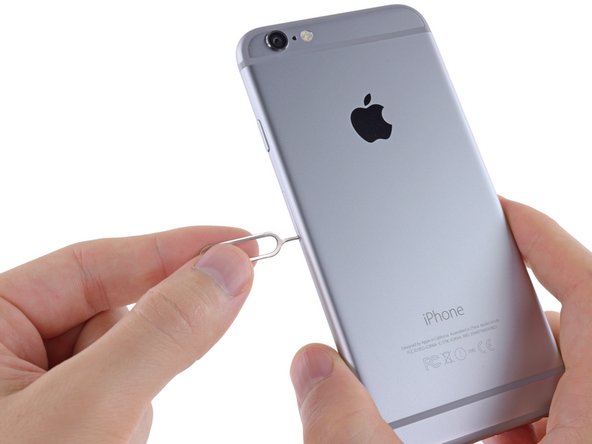
Carefully insert the SIM card ejector tool or the bent paperclip (or any tool you are using) into the tiny pinhole opening on the SIM card tray

2. Press gently and the SIM card tray will pop open. It will simply come out of the iPhone or iPad. Apply pressure in a straight line, not in an angular direction.

3. Pull out the SIM card tray. You will be able to see the SIM card inside in its designated slot.

Pull out the SIM card tray. You will be able to see the SIM card inside in its designated slot

4. Remove the SIM card from its slot. If you are inserting a new SIM card or reinserting the same one, ensure that you align the corners correctly following the markers in the slot and the notched corners on the card.

5. Once you have inserted the new SIM card into the tray, gently push it back inside the iPhone. Insert it carefully maintaining the correct orientation, alignment, and direction. It should go in exactly how it came out.

how to remove a SIM card from an iPhone
This is the method of how to remove a SIM card from an iPhone. If you find that the SIM card tray is not going back inside the iPhone easily, do not force it. Recheck the alignment and orientation, and see if you are holding it correctly. Check the position of the pinhole to make sure you are inserting it in the correct direction. Never try to force a SIM card tray inside the iPhone. You may risk breaking it and then your iPhone will no longer be able to connect to the SIM card.
how to remove a SIM card from an iPhone with SIM card ejector Removing a SIM card on iphone
Share. Facebook Twitter Pinterest LinkedIn Telegram Reddit Email
Previous ArticleAmazon Freedom Sale Starts, Opportunity to avail buffer discounts on purchases of electronic products including smartphones, TVs
Next Article PERSONALIZED GIFTS WITHOUT BREAKING THE BANK
Sayan Das

I have a penchant for writing on a variety of topics ranging from Technology to Psychology. With a Masters in Mass Communication and good command over the English language, I specialize in both fiction and non-fiction writing. When I am not blogging, I write and translate stories for children.

Related Posts

Dealing with Competitors Posting Negative Reviews

December 12, 2024

Unleashing the Thrill: A Deep Dive into RAJAGACOR – Your Ultimate Online Gaming Destination

January 2, 2024

How Architectural Tinting Can Enhance Your Building’s Energy Efficiency

October 17, 2023

Empowering Your Business with Jira Templates and Bug Ticket Templates

October 11, 2023

Exploring Font Styles: Unveiling the Power of Serif and Sans Serif Fonts

June 19, 2023

Testing Angular Web Applications: Strategies and Tools

June 17, 2023
Demo
Stay In Touch
  • Facebook
  • Twitter
  • Pinterest
  • Instagram
  • YouTube
  • Vimeo
Don't Miss

Beyond HPHT: Practical Thread Swaps to Meet the 2026 Preferred-Materials Target

By varshaAugust 27, 2025

HPHT lists help us say “no” to bad stuff. But stopping harm is only half…

Built-In Hygiene: Gral™ Protect Antimicrobial Threads for Wellness Wear & Uniforms

August 27, 2025

What Does the US-Issued Ban on State AI Rules Mean for Tech Innovation?

June 20, 2025

Dealing with Competitors Posting Negative Reviews

December 12, 2024

Subscribe to Updates

Get the latest creative news from SmartMag about art & design.

About Us
About Us
Our Picks

Dealing with Competitors Posting Negative Reviews

December 12, 2024

Exploring the Evolution of Auto Tint Technology: A Glimpse into the Future of Vehicle Enhancement

June 10, 2024

Top 25 Flowers to Send to Your Girlfriend and Celebrate Her Birthday in India

June 7, 2024
Facebook Twitter
  • Home
  • TERMS AND CONDITIONS
  • Submit Guest Post | Write For Us
  • Cookie Policy
  • DISCLAIMER
  • Contact Us
© 2026 SET NEWS BOX. All Rights Reserved. | scoopifyowl@gmail.com

Type above and press Enter to search. Press Esc to cancel.