



How to delete my Facebook Account – A to Z guide
Are you an addicted person to every time you log in to Facebook? Do you miss more critical things in your daily life because of that? Well, it’s one of the major problems among today’s new generation. So How do I delete my Facebook account or How to delete Facebook Account 2021?
Though you love social media works, it can directly waste your time also. Using it appropriately is your responsibility. Whether you have to study for an exam, some problems with your relationship, because of your parents’ advice or your thinking, you may need to delete or deactivate the Facebook account. How to delete an old Facebook account?
You should be aware that deactivating your Facebook account will not remove the profile from this platform forever. But, deleting your account is a permanent effect. Every message, post, and link will disappear forever. Apart from that, your friends also no longer can engage you.
You may like this: FB account hacked how to recover – How to recover/stop Facebook ID hacked?
How to delete your Facebook account / How to delete Facebook page
Before deleting your Facebook account, I suggest you download a copy of your information, such as photos and posts from Facebook.
Again it’s not a complicated process.

- Go through the Facebook data
- Click General

- Download a Copy of Your Facebook Data within few seconds

- Begin My Archive.
When you permanently delete your account, you can get back anything that you posted.
How to permanently delete Facebook
- Click in the upper right corner of your Facebook profile.

2. Scroll down
3. Do the tap Settings.
4. Scroll down to the Your Facebook information section
5. Click your Account ownership and control.

6. Select the name of deactivation and deletion
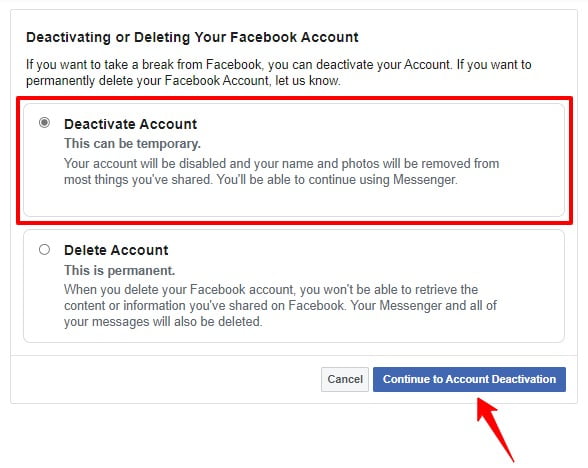
7. Choose the Delete Account.
8. Press on Continue to account deletion
9. Choose the ‘Delete Account
Now you have the simple answer for the question of how to delete a Facebook account permanently? Meanwhile, during the account deletion, you may think to cancel the account deletion? Is it possible?
Yes, If it’s been less than a month since you started the deletion of your account, you can cancel your account deletion. But remember, after one month, your budget and every information will delete forever.
Usually, it may take about 90 days to complete the procedure. During this period, no one can access your Facebook account.
Your information copies will keep after three months in backup storage. In this period, Facebook will recover software errors, other network issues, and other data loss incidents.
The way you can cancel the account deletion
- First of all, log in to your Facebook account (within one month of deleting your account)
- Click the Cancel Deletion.
But sometimes, you may feel not to delete your account completely. When you need to deactivate your account temporarily in case of deadlines or more important life events,
You may also like: How to take Backup your Facebook posts in Google Docs
How to deactivate Facebook?
If you’re using a web browser
- Navigate to Settings
- Security
- Deactivate Your Account.
- Once you’ve chosen this option, Facebook will ask you to verify your password to ensure you haven’t been hacked.
How to delete Facebook account on iPhone
You can also deactivate your account using your iPhone or Android phone.
by
- Enter to Settings
- Go to Account Settings
- Click the security
- Deactivate the Account
After completing this process, your name will disappear from the places that you commented. Though your friends can’t reply to your messages, they will see the previous chat. After the deactivation, If again you think to use Facebook, log in to your account, and it will reactivate.
As you saw, the deletion process is more complex than the deactivation process. Of course, before you start to delete the account, you need to ask Facebook for the deletion.
Since there are two options as deactivation and deletion of the account, you can choose the options of either deactivating and deleting your account. In case of deactivation, you can reactivate it when you need. This means that you can enter your photos, videos, friends, and groups again.
Facebook members or other people can’t check your timeline or find your account in search results unless you reactivate the account.
You may ask to access the email or confirm the mobile number you used to log in to complete the reactivation.
Today we can see a lot of youngers spend their time browsing the network. They consider Facebook as the best type of communication method. The incredible model of networking is Facebook, apart from Twitter. It is more beneficial to use Facebook and Twitter, but there are some adverse effects as well.
Social media is becoming famous, and more official communication is carried out on them and private life. Indeed, the over usage of any social media platform is not good. Before check the harmful effects of Facebook, let us have a cursory look at the positive impacts of Facebook’s social media platform.
Positive effects of Facebook:
- Developments of moods: People can associate with their friends. A person can communicate with far-off friends. By being close with their friends, one feels okay. The spirit will be good, and they feel close to one’s loved ones.
- Less Shyness with others. Many teenagers go through a phase when they do not need to engage with the rest of the people.
- Permits one to improve – Self-identity: Facebook is a ground for face-to-face communication, which enhances self-identification.
There are some adverse effects of Facebook as well.
10 Negative effects of Facebook on the young generation.
- Isolation
- Putting on weight
- Unusual behaviors and symptoms
- Not suitable for the eyes
- Less emotional connection
- Increase the laziness
- Reason for distractions
- Less of body language connection
- Unusual and unhealthy sex approach
Hopefully, you may get the answers to how to delete your Facebook account permanently immediately. If you got any questions, please put them in the comment section.
