• Contact
  • Home
  • App
  • Business
    • Finance
  • News
    • Entertainment
      • Games
      • Social Media
    • Hindi News
    • Misc
    • Trending
  • Tech
    • Gadgets Update
    • How To
    • iPhone
  • Hindi

Subscribe to Updates

Get the latest creative news from FooBar about art, design and business.

What's Hot

Beyond HPHT: Practical Thread Swaps to Meet the 2026 Preferred-Materials Target

August 27, 2025

Built-In Hygiene: Gral™ Protect Antimicrobial Threads for Wellness Wear & Uniforms

August 27, 2025

What Does the US-Issued Ban on State AI Rules Mean for Tech Innovation?

June 20, 2025
Facebook Twitter Instagram
SUBSCRIBE
  • Contact
  • Home
  • App
  • Business
    • Finance
  • News
    • Entertainment
      • Games
      • Social Media
    • Hindi News
    • Misc
    • Trending
  • Tech
    • Gadgets Update
    • How To
    • iPhone
  • Hindi
Home»Tech»How To»How to Fix Error 9006 When Restoring iPhone | Setnewsbox
How To

How to Fix Error 9006 When Restoring iPhone | Setnewsbox

Sayan DasBy Sayan DasJuly 16, 2020No Comments3 Mins Read
How to Fix Error 9006 When Restoring iPhone
Share
Facebook Twitter Reddit Telegram Pinterest Email
Contents hide
How to Fix Error 9006 When Restoring iPhone
What causes error 9006?
How to resolve iTunes error 9006?
Alternative method

How to Fix Error 9006 When Restoring iPhone

How to Fix Error 9006 When Restoring iPhone

How to Fix Error 9006 or iTunes error 9006 is a software issue that crops up when trying to restore or update an iPhone. It also appears while trying to download the software on an iPhone or iPad. The error message shows that “there was a problem downloading software” and that “an unknown error occurred (9006).” This appears as an “err = 9006” message over the frozen download or update window. We will learn here how to fix error 9006.

Although the error 9006 can be easily resolved using some easy methods, sometimes it may not be the case. If basic troubleshooting does not work and the update or restoration of the iPhone fails, you have to consider other options. Learning more about how to fix error 9006 will help in this regard.

What causes error 9006?

Before learning how to fix error 9006, let us look at its cause. This error occurs when an iPhone is not able to connect to the iOS software update servers. Therefore, it results in an incomplete download or a failed software update. This is caused usually because of firewalls or anti-virus apps /software. However, the internet connection may also be blamed. Sometimes, an incompatible version of the OS itself or an outdated version of iTunes too can cause error 9006.

How to resolve iTunes error 9006?

When you are attempting to restore your iPhone or trying to update the iOS, you may encounter error 9006. To resolve it, follow the below steps:
  1. Ensure that you have a working internet connection. Keep your device connected.
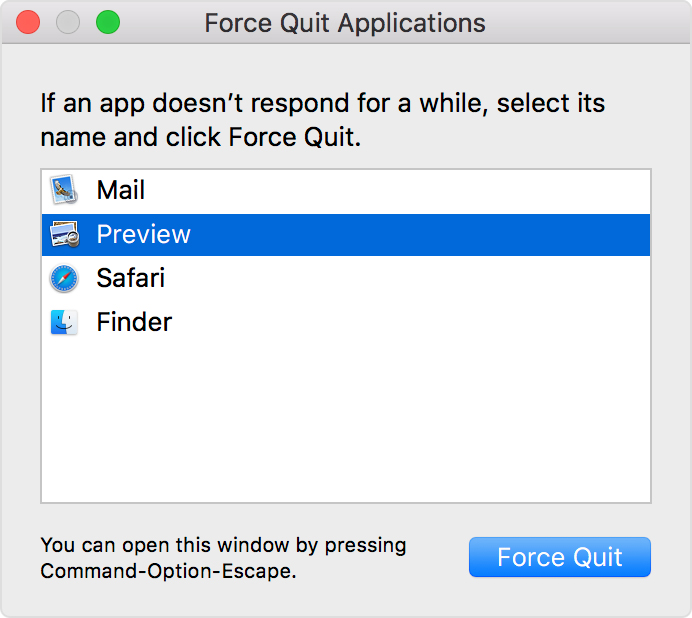
  2. Quit iTunes. Close the app.

How to force an app to quit on your Mac

3. Update iTunes. Check for other software updates on your Mac OS and install them.
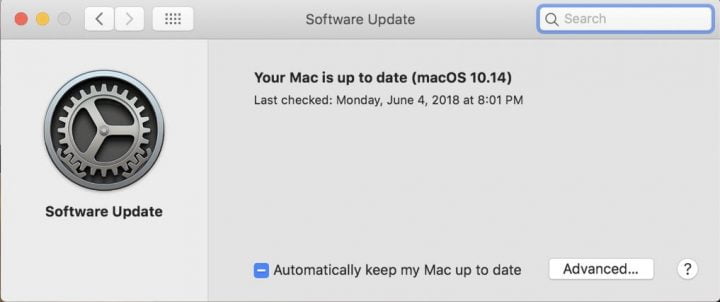
How to update MAC

4. Restart your computer.

5. Disable anti-virus software and firewalls, if you are using any. This is only temporary: you can activate them again once error 9006 is fixed.

How To Fix iTunes Error 9006

  1. Use another USB port on the same computer and start the update again.
Here, we update the iTunes app to its latest version and deactivate firewalls and anti-virus software to resolve error 9006. This process of how to fix error 9006 should work in most cases. But what if it doesn’t?

Alternative method

If the first method does not work, you have to manually intervene. This one is a two-step process. First, you must locate the failed IPSW files and delete them. And next, download the IPSW files again or update them. This will update your iPhone and fix error 9006.
  1. Go to your system directory and locate the failed IPSW files. They should be available in any of the paths: ~/Library/iTunes/ or ~/Library/iTunes/iPhone Software Updates depending on your device and the version.
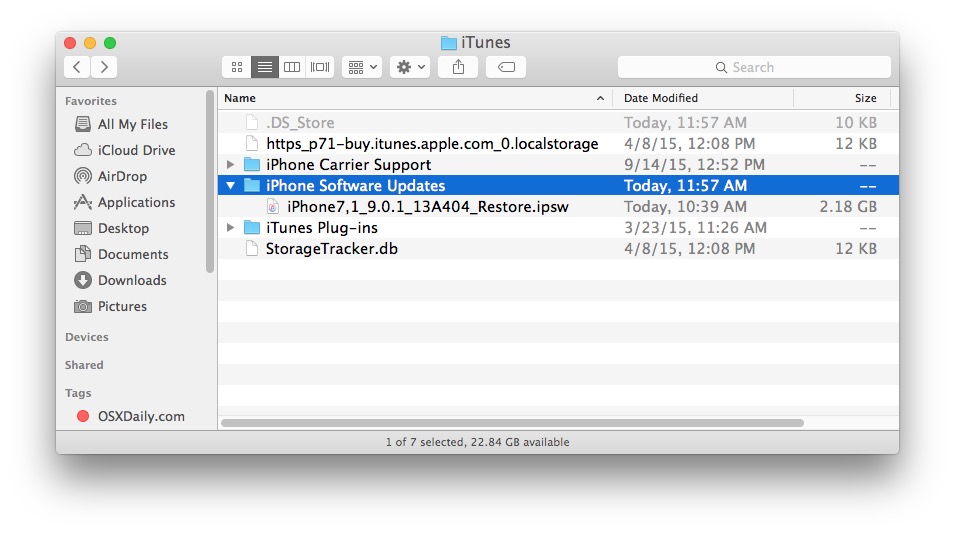
IPSW File Location for Mac and Windows

  1. Manually delete the old IPSW files from iTunes.
  2. Use the IPSW files to directly update them, or redownload them.
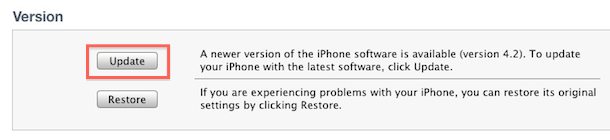
How to Use IPSW files

This is the manual method of how to fix error 9006 and will work fine if the first method fails.
How to Fix Error 9006 How to Fix Error 9006 When Restoring iPhone How to resolve iTunes error 9006?
Share. Facebook Twitter Pinterest LinkedIn Telegram Reddit Email
Previous ArticleHow to use Manav Sampada UP Portal for Government Employees
Next Article iOS 13.6 update released, new health-related features will be available including Car Key
Sayan Das

I have a penchant for writing on a variety of topics ranging from Technology to Psychology. With a Masters in Mass Communication and good command over the English language, I specialize in both fiction and non-fiction writing. When I am not blogging, I write and translate stories for children.

Related Posts

Dealing with Competitors Posting Negative Reviews

December 12, 2024

Unleashing the Thrill: A Deep Dive into RAJAGACOR – Your Ultimate Online Gaming Destination

January 2, 2024

How Architectural Tinting Can Enhance Your Building’s Energy Efficiency

October 17, 2023

Empowering Your Business with Jira Templates and Bug Ticket Templates

October 11, 2023

Exploring Font Styles: Unveiling the Power of Serif and Sans Serif Fonts

June 19, 2023

Testing Angular Web Applications: Strategies and Tools

June 17, 2023
Demo
Stay In Touch
  • Facebook
  • Twitter
  • Pinterest
  • Instagram
  • YouTube
  • Vimeo
Don't Miss

Beyond HPHT: Practical Thread Swaps to Meet the 2026 Preferred-Materials Target

By varshaAugust 27, 2025

HPHT lists help us say “no” to bad stuff. But stopping harm is only half…

Built-In Hygiene: Gral™ Protect Antimicrobial Threads for Wellness Wear & Uniforms

August 27, 2025

What Does the US-Issued Ban on State AI Rules Mean for Tech Innovation?

June 20, 2025

Dealing with Competitors Posting Negative Reviews

December 12, 2024

Subscribe to Updates

Get the latest creative news from SmartMag about art & design.

About Us
About Us
Our Picks

Dealing with Competitors Posting Negative Reviews

December 12, 2024

Exploring the Evolution of Auto Tint Technology: A Glimpse into the Future of Vehicle Enhancement

June 10, 2024

Top 25 Flowers to Send to Your Girlfriend and Celebrate Her Birthday in India

June 7, 2024
Facebook Twitter
  • Home
  • TERMS AND CONDITIONS
  • Submit Guest Post | Write For Us
  • Cookie Policy
  • DISCLAIMER
  • Contact Us
© 2026 SET NEWS BOX. All Rights Reserved. | scoopifyowl@gmail.com

Type above and press Enter to search. Press Esc to cancel.